Altium Designer 26.9.1.10 Download
Altium Designer 26.9.1 is a professional electronic design and PCB development solution built for engineers, PCB designers, and electronics development teams. It combines schematic capture, PCB layout, interactive routing, simulation, 3D visualization, design verification, and manufacturing preparation within a unified design environment.
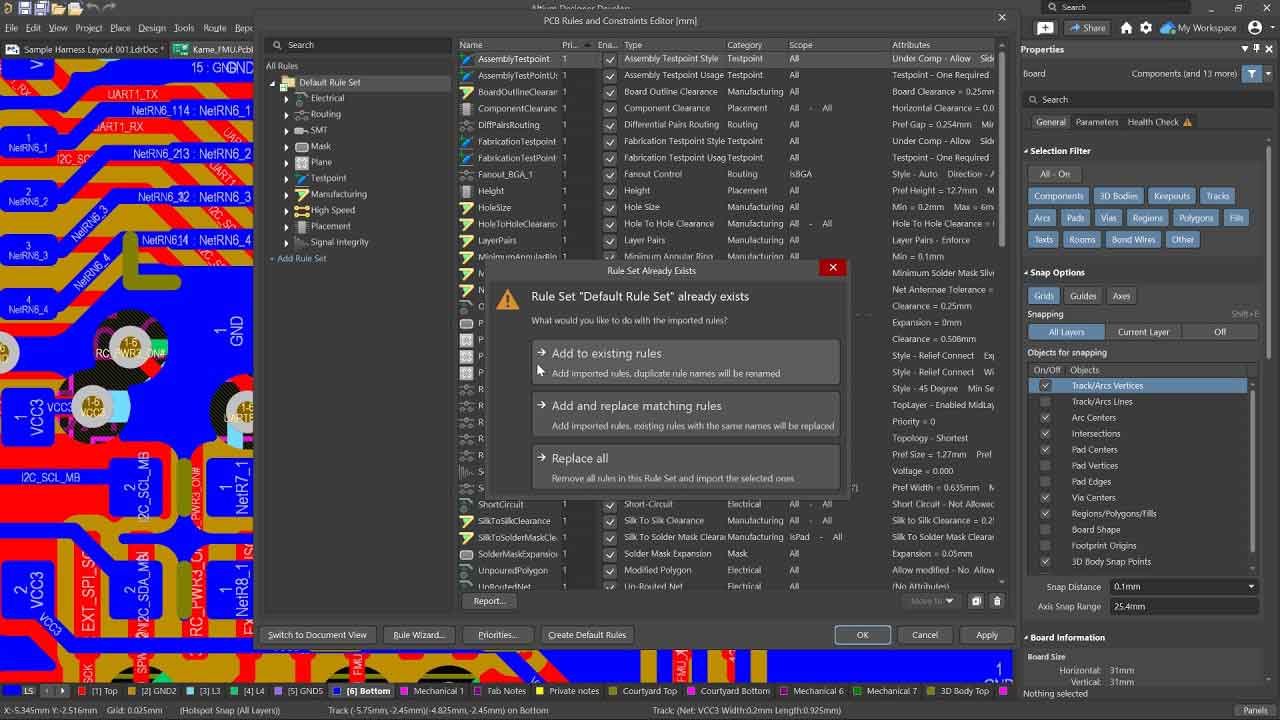
The latest Altium Designer 26.10.1 release was published on September 9, 2026. This version continues the development of the Altium Designer 26 platform with improvements to PCB design, design-rule management, harness design, and other areas of the electronic design workflow.
What Is Altium Designer?
Altium Designer is an electronic design automation platform focused on printed circuit board development. Rather than requiring separate applications for schematic design, PCB layout, 3D inspection, and manufacturing preparation, Altium Designer brings these capabilities together within one environment.
The software supports the complete workflow from creating an electronic schematic to designing the physical PCB and preparing manufacturing documentation.
It is commonly used for projects ranging from relatively simple embedded boards to complex, high-density electronic products.
What Is New in Altium Designer 26.10.1?
Altium Designer 26.10.1 is the latest public release of the software as of September 2026.
One of the notable additions in the 26.10 release is the introduction of Design Rule Sets, currently available as an Open Beta feature. Rule Sets allow designers to organize groups of PCB design rules and reuse them across different design scenarios.
Rules can be grouped, duplicated, imported, exported, enabled, or disabled as sets. This can make it easier to manage different requirements for interfaces, manufacturers, or specific areas of a PCB design.
The release also includes improvements to harness design and other fixes and enhancements across the software.
PCB Design and Layout
PCB layout is one of the core functions of Altium Designer. The PCB editor provides tools for positioning components, defining board geometry, creating copper features, managing layers, and routing electrical connections.
Designers can work with complex multilayer boards while maintaining control over design constraints and manufacturing requirements.
The software also provides native 3D visualization, allowing designers to inspect the physical representation of a PCB and identify potential clearance or mechanical issues before manufacturing.
Advanced PCB Routing
Altium Designer includes an interactive routing engine designed for high-speed and high-density PCB layouts.
Designers can route signals while working with defined electrical and physical constraints. Routing tools can be used for standard signals as well as more demanding high-speed designs.
The environment also supports modern board technologies such as rigid-flex PCB design.
Schematic Capture
Altium Designer provides a complete schematic design environment for creating electronic circuits.
Engineers can place components, connect nets, define design parameters, organize hierarchical designs, and prepare schematics for PCB implementation.
The connection between schematic and PCB documents helps maintain consistency as the design develops.
Design Rules and Constraints
Design rules are essential for ensuring that a PCB meets electrical, physical, and manufacturing requirements.
Altium Designer provides extensive rule and constraint management capabilities for defining requirements such as:
- Clearance
- Track width
- Routing constraints
- Via requirements
- Component placement
- Differential pairs
- High-speed signals
- Layer-specific requirements
- Manufacturing constraints
The new Rule Sets functionality in Altium Designer 26.10 provides another way to organize and reuse groups of rules across projects or design scenarios.
High-Density PCB Design
Modern electronics often require increasingly compact PCB layouts with a large number of components and signal connections.
Altium Designer 26.8 introduced support for up to 128 signal layers, expanding the capability available for large and highly complex PCB designs.
This support extends across areas such as the PCB editor, Layer Stack Manager, design-rule checking, filtering, and output generation.
3D PCB Visualization
Altium Designer includes integrated 3D visualization so designers can inspect a board before physical production.
The 3D environment can be used to examine component placement, board geometry, mechanical clearances, and the relationship between the PCB and its physical components.
This is particularly useful when an electronic design must fit inside a mechanical enclosure or interact with other physical components.
Simulation and Circuit Analysis
Altium Designer also provides simulation capabilities for analyzing electronic circuits and validating designs before moving to physical manufacturing.
Depending on the design and workflow, engineers can use simulation and analysis tools to investigate circuit behavior and identify potential problems earlier in the development process.
Combining schematic design, simulation, PCB layout, and design verification in the same environment can reduce the need to repeatedly move design information between separate applications.
Component and Library Management
Electronic designs depend heavily on accurate component information.
Altium Designer provides tools for working with schematic symbols, PCB footprints, component models, parameters, and other design data.
Designers can create and reuse component information while maintaining relationships between schematic symbols and physical PCB footprints.
This helps reduce errors caused by using incorrect component models during PCB development.
Rigid-Flex PCB Design
Altium Designer supports rigid-flex PCB development for products that require flexible sections combined with rigid PCB areas.
The design environment provides tools for defining board regions and working with complex physical structures.
Rigid-flex capabilities are particularly useful for compact electronics where conventional rigid PCBs cannot provide the required mechanical flexibility.
Harness and Multi-Board Design
Altium Designer also extends beyond conventional single-board PCB development.
The platform includes tools for multi-board design and harness development, allowing engineers to work with multiple electronic boards and their physical or electrical relationships.
Recent Altium Designer releases have continued to improve harness design capabilities, including visualization and layout-related functionality.
Manufacturing Documentation
After completing a PCB design, engineers need to generate manufacturing information and documentation.
Altium Designer provides output preparation and release-management tools for preparing the data required for PCB fabrication and assembly.
Depending on the project, the workflow can include manufacturing files, drawings, documentation, reports, and other production-related outputs.
Keeping these processes within the same design environment helps maintain consistency between the engineering design and the final manufacturing package.
3D Mechanical Integration
PCB development often involves close cooperation between electrical and mechanical engineers.
Altium Designer supports 3D mechanical data and provides integration capabilities for working with mechanical models.
Recent versions have also expanded support for mechanical formats. For example, Altium Designer 26.3 added support for SOLIDWORKS 2024 and 2025 models when working with 3D bodies and updated Parasolid export capabilities.
Requirements and Design Management
Complex electronic products require more than schematic and PCB files.
Altium Designer can be integrated with broader design-management workflows, helping engineering teams connect requirements and design information.
The Requirements Portal integration introduced in Altium Designer 26.8 allows requirements to be connected directly to schematic or PCB documents and provides tools for tracking verification status.
This can be useful for projects where engineering requirements must remain connected to the implementation and verification process.
Altium Designer 26 Features
Some of the important capabilities available across the Altium Designer 26 platform include:
- Advanced PCB layout
- Interactive routing
- Schematic capture
- Design rule management
- Constraint management
- High-speed PCB design
- Up to 128 signal layers
- Native 3D PCB visualization
- Rigid-flex PCB design
- Circuit simulation
- Component and library management
- Multi-board design
- Harness design
- Manufacturing output preparation
- Mechanical CAD integration
- Requirements management
- Design reuse
- PCB design verification
Who Uses Altium Designer?
Altium Designer is primarily aimed at professional electronics development.
Typical users include:
- PCB designers
- Electrical engineers
- Electronics engineers
- Embedded systems engineers
- Hardware development teams
- Product development companies
- Engineering consultants
- Electronics manufacturers
- Research and development teams
It is particularly suitable for teams working on products where PCB complexity, signal integrity, mechanical integration, and manufacturing requirements need to be managed together.
Altium Designer vs Basic PCB Design Software
Basic PCB design applications can be suitable for simple boards and hobby projects, but complex commercial products often require more advanced design and verification capabilities.
Altium Designer combines schematic capture, PCB layout, routing, simulation, 3D visualization, design rules, component management, and manufacturing preparation in a single environment.
This unified approach can be valuable for professional teams because design information does not need to be constantly transferred between unrelated applications.
Is Altium Designer Good for Professional PCB Design?
Yes. Altium Designer is designed specifically for professional electronic product development and supports workflows ranging from schematic capture through PCB layout and manufacturing preparation.
Its combination of advanced routing, constraint management, 3D visualization, simulation, design-rule checking, and manufacturing tools makes it suitable for complex PCB projects.
System and Workflow Considerations
Altium Designer is a professional engineering application, so its hardware requirements are considerably higher than those of lightweight schematic or PCB tools.
For large designs, users should consider a modern multi-core processor, sufficient system memory, fast storage, and a capable graphics processor for comfortable 2D and 3D operation.
Exact requirements can vary between Altium Designer releases, so users should check the official documentation before installation.
Altium Designer 26.10.1 FAQ
What is Altium Designer?
Altium Designer is professional electronic design software used for schematic capture, PCB layout, routing, simulation, 3D visualization, design verification, and manufacturing preparation.
What is the latest version of Altium Designer?
As of September 2026, the latest public release is Altium Designer 26.10.1, released on September 9, 2026.
Is Altium Designer used for PCB design?
Yes. PCB design and layout are among the primary functions of Altium Designer.
Can Altium Designer create schematics?
Yes. Altium Designer includes a dedicated schematic design environment for creating and developing electronic circuits.
Does Altium Designer support 3D PCB design?
Yes. The software includes native 3D visualization and tools for inspecting PCB geometry, components, and clearances.
Does Altium Designer support high-density PCBs?
Yes. Altium Designer supports advanced PCB layouts, and version 26.8 increased the supported number of signal layers to 128.
Does Altium Designer support rigid-flex PCBs?
Yes. Rigid-flex board design is supported as part of the Altium Designer PCB development environment.
Can Altium Designer be used for manufacturing?
Yes. The software provides output preparation and release-management tools for generating manufacturing-related documentation and data.
Is Altium Designer suitable for beginners?
Altium Designer can be used by beginners, but it is primarily a professional engineering platform with a large number of advanced features. New users may need time to become familiar with schematic capture, PCB layout, design rules, routing, libraries, and manufacturing workflows.
Conclusion
Altium Designer 26.10.1 is a comprehensive PCB and electronic product development platform for engineers and professional PCB designers. Its unified environment brings schematic capture, PCB layout, advanced routing, simulation, 3D visualization, design-rule management, component data, and manufacturing preparation into one workflow.
For users working on increasingly complex electronic products, features such as advanced routing, rigid-flex design, high-density PCB support, 3D inspection, harness design, and requirements management make Altium Designer a powerful solution for modern electronics development.
Price : 20$
Email : royalprog.contact@gmail.com
WhatsApp : +19084456316