MATLAB R2026a – Engineering, Scientific Computing and Data Analysis Software
MATLAB R2026a is the 2026a release of MathWorks’ engineering and scientific computing platform. It provides an integrated environment for numerical computation, programming, data analysis, visualization, algorithm development, simulation, and technical application development.
MATLAB is used across engineering, science, research, education, finance, and other technical fields. Its extensive collection of functions and specialized toolboxes allows users to work with everything from mathematical calculations and signal processing to machine learning, image processing, control systems, wireless communications, and embedded systems.
R2026a introduces new capabilities across the MATLAB and Simulink product families, including expanded AI-assisted engineering workflows, improved Python integration, new visualization capabilities, and updates to numerous specialized toolboxes.
What Is MATLAB?
MATLAB is a programming and numerical computing environment developed by MathWorks. The platform combines a programming language with interactive development tools for mathematical calculations, data analysis, visualization, and engineering applications.
The name MATLAB comes from “MATrix LABoratory,” reflecting its origins in matrix and numerical computation.
Today, MATLAB extends far beyond basic matrix calculations. It provides tools for developing algorithms, processing large datasets, creating interactive applications, analyzing signals and images, training machine learning models, and connecting software with hardware.
What’s New in MATLAB R2026a?
MATLAB R2026a was released as part of the 2026a MATLAB and Simulink product release. MathWorks describes the release as containing hundreds of new and updated features across the MATLAB and Simulink ecosystem.
Some of the notable MATLAB R2026a improvements include:
- MATLAB Web Canvas for sharing interactive graphics on the web
- Improved Python environment management
- Expanded MATLAB Copilot capabilities
- MATLAB Agentic Toolkit
- Automatic differentiation support for ODEs
- New UMAP functionality for high-dimensional data visualization
- Machine learning pipeline workflows
- JSON table and timetable support
- Improvements to MATLAB Live Editor
- Performance improvements across MATLAB functions
- Expanded tools for engineering and scientific applications
MATLAB Web Canvas
One of the notable R2026a additions is Web Canvas.
Web Canvas allows MATLAB graphics and live scripts to be exported as interactive HTML content. Users can share visualizations that retain interactive capabilities such as zooming, panning, and rotation in a modern web browser.
This makes it easier to share technical results with colleagues or publish interactive MATLAB visualizations without requiring the viewer to have MATLAB installed.
Python Integration
MATLAB has long provided integration with Python, allowing engineers and researchers to combine MATLAB functionality with Python libraries and applications.
R2026a expands this workflow with an External Languages panel for creating and managing Python environments directly from MATLAB.
Users can work with virtual environments, install packages, and manage Python configurations from within the MATLAB environment. MATLAB can also exchange data with Python and use Python functionality as part of larger engineering workflows.
MATLAB Copilot and AI-Assisted Development
MATLAB Copilot provides AI-assisted support within MATLAB development workflows.
R2026a expands MathWorks’ broader AI strategy with additional agentic capabilities across MATLAB and Simulink.
The MATLAB Agentic Toolkit is designed to connect AI agents with MATLAB functionality and support engineering workflows through programmatic interaction with MATLAB.
These capabilities are intended to assist with tasks such as code development, analysis, and working with engineering data while keeping the engineering environment and its documentation in context.
Numerical Computing
Numerical computation remains one of MATLAB’s primary strengths.
MATLAB provides built-in functions for:
- Matrix operations
- Linear algebra
- Numerical integration
- Differential equations
- Optimization
- Statistics
- Fourier analysis
- Numerical interpolation
- Polynomial calculations
- Equation solving
- Numerical modeling
The platform can handle mathematical operations interactively through the Command Window or through reusable scripts and functions.
MATLAB Programming
MATLAB includes its own high-level programming language designed around numerical and technical computing.
Users can create:
- Scripts
- Functions
- Classes
- Live Scripts
- Apps
- Algorithms
- Data-processing workflows
The language supports common programming concepts such as loops, conditional statements, functions, object-oriented programming, structures, tables, and arrays.
MATLAB also provides an integrated development environment with debugging, code analysis, documentation, and visualization tools.
Data Analysis
MATLAB provides a broad set of tools for importing, cleaning, processing, analyzing, and visualizing data.
Engineers and researchers can work with data from files, databases, sensors, hardware, scientific instruments, and external applications.
Common workflows include:
- Data cleaning
- Statistical analysis
- Curve fitting
- Regression
- Signal analysis
- Time-series analysis
- Feature extraction
- Data visualization
- Predictive modeling
MATLAB’s table and timetable data types are particularly useful for working with structured datasets and time-dependent measurements.
Data Visualization
MATLAB includes extensive visualization capabilities for exploring and presenting technical data.
Users can create:
- 2D plots
- 3D plots
- Surface plots
- Contour plots
- Histograms
- Scatter plots
- Heatmaps
- Images
- Animations
- Interactive graphics
R2026a also expands the ability to share interactive visualizations through Web Canvas.
Machine Learning
MATLAB provides tools for developing and evaluating machine learning models.
Depending on the available toolbox, users can work with:
- Classification
- Regression
- Clustering
- Feature selection
- Dimensionality reduction
- Deep learning
- Predictive modeling
- Model evaluation
- Data preprocessing
R2026a also introduces machine learning pipeline capabilities in Statistics and Machine Learning Toolbox, allowing multiple data-processing and modeling steps to be organized into a single workflow.
The release also introduces the umap function for visualizing high-dimensional data as a 2D or 3D embedding.
Deep Learning and AI
MATLAB provides specialized tools for developing deep learning and AI applications.
Engineers and researchers can develop, train, analyze, and deploy neural network models for applications such as:
- Computer vision
- Image classification
- Object detection
- Signal classification
- Time-series prediction
- Natural language processing
- Autonomous systems
MATLAB can also work with models developed using external machine learning frameworks and provides tools for deployment to different hardware and software environments.
Signal Processing
MATLAB is widely used for signal processing and analysis.
Signal Processing Toolbox provides tools for designing filters, analyzing signals, extracting features, and working with time-frequency data.
R2026a introduces updates including the new Filter Designer and Filter Analyzer apps, improvements to Signal Labeler, and the Signal Feature Extractor workflow.
Applications can include:
- Audio processing
- Communications
- Sensor data analysis
- Biomedical signals
- Vibration analysis
- Radar
- Industrial monitoring
Image Processing and Computer Vision
MATLAB provides specialized tools for processing images and analyzing visual information.
Typical applications include:
- Image enhancement
- Image segmentation
- Object detection
- Feature extraction
- Image registration
- Computer vision
- Video processing
- 3D vision
These capabilities can be combined with machine learning and deep learning workflows to create advanced computer vision applications.
Control System Design
MATLAB and Simulink are widely used for control-system development.
Control engineers can use MATLAB for:
- Control-system analysis
- Controller design
- Transfer functions
- State-space models
- Stability analysis
- Frequency-response analysis
- PID controller design
- Model-based control development
Simulink extends these capabilities with graphical modeling and simulation of dynamic systems.
Simulink Integration
MATLAB and Simulink are closely integrated.
While MATLAB focuses heavily on programming, numerical computation, data analysis, and algorithm development, Simulink provides a block-diagram environment for modeling and simulating dynamic systems.
The two environments can exchange data and work together throughout development.
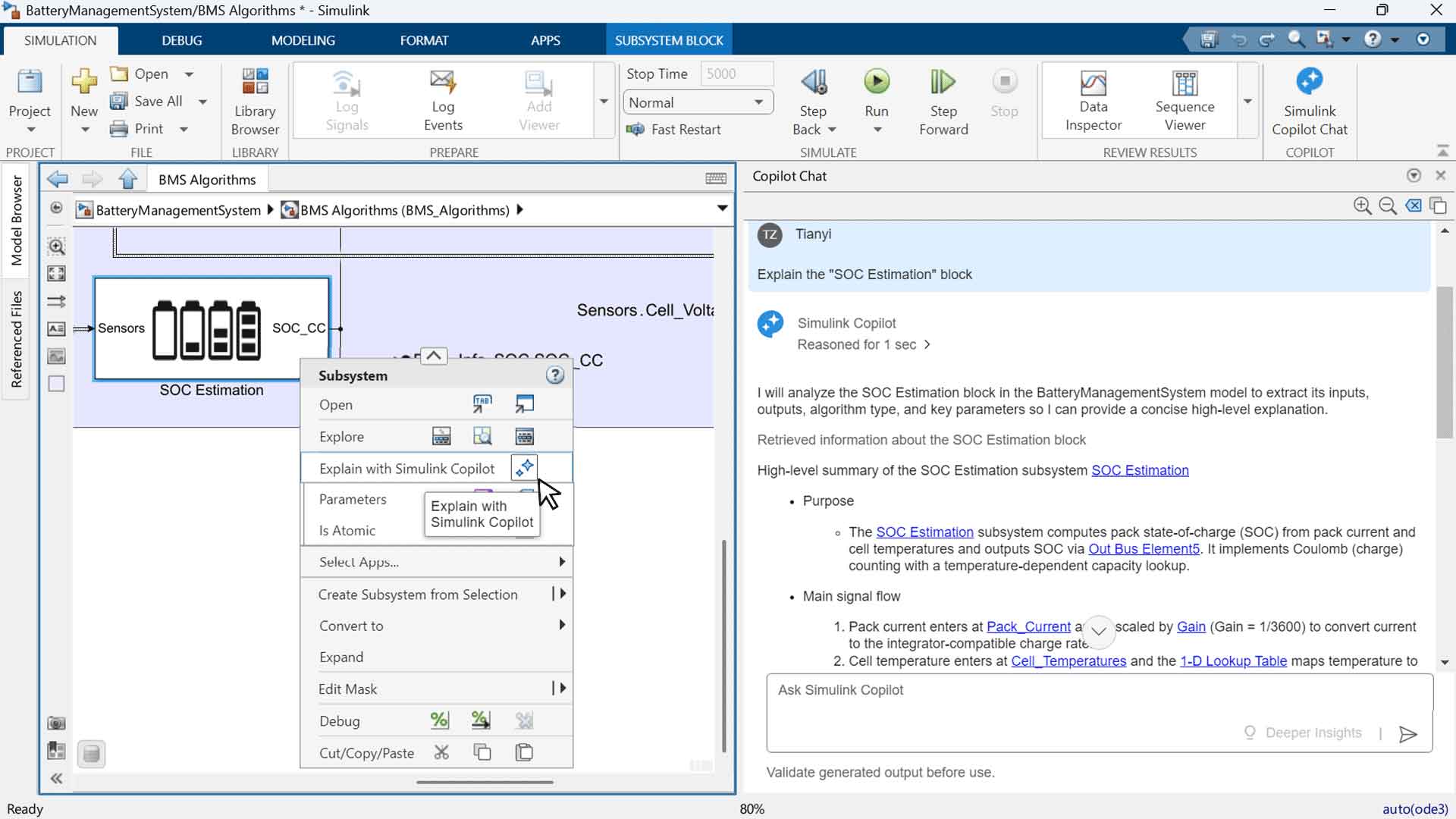
R2026a also introduces Simulink Copilot, an AI assistant designed specifically for Simulink and model-based design workflows. It can help users understand models, locate blocks and subsystems, troubleshoot issues, and perform supported engineering tasks.
Engineering Toolboxes
One of MATLAB’s major advantages is its toolbox ecosystem.
Specialized toolboxes extend the core environment for specific technical disciplines.
Examples include:
- Simulink
- Control System Toolbox
- Signal Processing Toolbox
- Image Processing Toolbox
- Computer Vision Toolbox
- Statistics and Machine Learning Toolbox
- Optimization Toolbox
- Deep Learning Toolbox
- Communications Toolbox
- RF Toolbox
- Antenna Toolbox
- Aerospace Toolbox
- Robotics System Toolbox
- Parallel Computing Toolbox
- Symbolic Math Toolbox
- MATLAB Coder
- GPU Coder
- Simscape
The exact products available depend on the MATLAB license and the user’s subscription or maintenance configuration.
Parallel Computing and GPU Acceleration
MATLAB can take advantage of parallel computing resources for computationally intensive workloads.
Parallel Computing Toolbox provides tools for running calculations on multicore processors, clusters, and supported GPUs.
This can be particularly useful for large numerical simulations, image processing, optimization, machine learning, and other computational workloads.
Automatic Differentiation in R2026a
R2026a adds automatic differentiation support to base MATLAB for certain ordinary differential equation workflows.
The ode object can use the JacobianMethod property to specify whether Jacobians are calculated using finite differences or automatic differentiation.
MathWorks notes that automatic differentiation can be useful for large stiff systems and sensitivity analysis.
MATLAB Live Editor
MATLAB Live Editor allows users to combine code, output, equations, formatted text, and visualizations within interactive live scripts.
This makes Live Scripts useful for:
- Research reports
- Engineering calculations
- Data analysis
- Educational material
- Algorithm demonstrations
- Technical documentation
R2026a also adds additional Live Editor functionality, including multilevel lists and the ability to run user-defined code from a button control in a live script.
App Development with MATLAB
MATLAB includes App Designer for creating graphical applications.
Users can create interfaces containing:
- Buttons
- Sliders
- Tables
- Charts
- Input fields
- Interactive controls
- Custom visualizations
These applications can turn MATLAB algorithms into easier-to-use engineering and scientific tools.
R2026a also introduces MATLAB Course Designer, a product for creating courses, courseware, laboratories, and assessments using MATLAB and Simulink.
MATLAB for Embedded Systems
MATLAB is also used for developing algorithms that eventually run on embedded hardware.
With products such as MATLAB Coder, engineers can generate C and C++ code from MATLAB algorithms.
Additional MathWorks products support workflows involving GPUs, FPGAs, microcontrollers, and other embedded platforms.
R2026a expands this ecosystem with new hardware-related products and support packages, including the STM32 Microcontroller Blockset and Raspberry Pi Blockset.
MATLAB for RF and Wireless Engineering
MATLAB provides specialized capabilities for RF, antenna, and wireless communication development.
RF-related workflows can include:
- RF component modeling
- S-parameter analysis
- Antenna design
- Wireless system simulation
- Radar modeling
- Signal analysis
- Electromagnetic analysis
R2026a includes updates to RF Toolbox, RF PCB Toolbox, and related products for wireless and RF engineering applications.
MATLAB for Research and Education
MATLAB is widely used in academic and research environments because it combines programming, mathematics, visualization, and specialized technical libraries.
Students and researchers can use MATLAB for:
- Mathematical modeling
- Laboratory data analysis
- Numerical methods
- Signal processing
- Machine learning
- Engineering simulations
- Scientific visualization
- Algorithm development
Its Live Editor and extensive documentation also make it suitable for teaching technical concepts through interactive examples.
MATLAB R2026a System Requirements
MATLAB is available for Windows, macOS, and Linux, with exact requirements depending on the operating system and release.
For current system requirements, users should consult MathWorks’ official documentation because supported operating systems, hardware requirements, and graphics requirements can change between releases.
For example, the R2026b prerelease Windows requirements list Windows 11 version 24H2 or higher, Windows 10 version 22H2, Windows Server 2025, and Windows Server 2022, with 8 GB RAM as the minimum and 16 GB recommended. These are prerelease R2026b requirements rather than a direct specification for R2026a, so they should not be treated as identical.
MATLAB R2026a Key Features
The major capabilities associated with MATLAB R2026a include:
- Numerical computing
- MATLAB programming language
- Data analysis
- Data visualization
- Machine learning
- Deep learning
- Signal processing
- Image processing
- Computer vision
- Optimization
- Control-system design
- Scientific computing
- Simulink integration
- Python integration
- MATLAB Copilot
- MATLAB Agentic Toolkit
- Web Canvas
- Live Editor
- App Designer
- Parallel computing
- GPU computing
- Code generation
- Embedded-system development
- RF and wireless engineering
Who Uses MATLAB?
MATLAB is designed for technical users working with mathematical, scientific, and engineering problems.
Typical users include:
- Engineers
- Scientists
- Researchers
- Data analysts
- Software developers
- University students
- Professors and educators
- Control engineers
- Electrical engineers
- Mechanical engineers
- Aerospace engineers
- Robotics engineers
- Signal-processing engineers
- Machine-learning researchers
Is MATLAB Suitable for Engineering?
MATLAB is specifically designed for technical computing and provides specialized functionality for many engineering disciplines.
Its combination of numerical computation, visualization, programming, simulation, and domain-specific toolboxes makes it suitable for engineering analysis and algorithm development.
MATLAB R2026a FAQ
What is MATLAB R2026a?
MATLAB R2026a is the 2026a release of MathWorks’ MATLAB and Simulink product family. It includes updates to the core MATLAB environment and numerous specialized toolboxes.
What is the difference between MATLAB R2026 and R2026a?
R2026 refers to the 2026 release family, while R2026a is the specific first release in that yearly cycle. MathWorks generally publishes two major MATLAB releases each year, identified with the letters a and b.
Is MATLAB a programming language?
MATLAB includes its own programming language designed primarily for numerical and technical computing. It can be used to create scripts, functions, classes, applications, and algorithms.
Can MATLAB work with Python?
Yes. MATLAB provides Python integration, and R2026a adds tools for creating and managing Python environments directly from MATLAB.
Does MATLAB support machine learning?
Yes. MATLAB provides machine learning capabilities through products such as Statistics and Machine Learning Toolbox and Deep Learning Toolbox.
Can MATLAB be used for signal processing?
Yes. MATLAB and Signal Processing Toolbox provide tools for filtering, signal analysis, feature extraction, time-frequency analysis, and related workflows.
Does MATLAB include Simulink?
MATLAB and Simulink are separate products within the MathWorks ecosystem, although they are designed to work closely together. A MATLAB license does not automatically mean that every Simulink product or toolbox is included.
What is MATLAB used for?
MATLAB is used for numerical computing, data analysis, engineering calculations, visualization, simulation, algorithm development, machine learning, signal processing, control systems, research, and many other technical applications.
Is MATLAB available for Windows?
Yes. MATLAB is available for Windows, along with versions for other supported operating systems. Exact operating-system support depends on the MATLAB release.
Conclusion
MATLAB R2026a continues MathWorks’ development of a unified environment for numerical computing, programming, engineering analysis, scientific research, and data visualization.
The release adds new capabilities such as Web Canvas, improved Python environment management, automatic differentiation for selected ODE workflows, expanded machine learning tools, and new AI-assisted development features. The wider R2026a release also introduces new Simulink and engineering products that extend the MATLAB ecosystem.
With its programming environment, visualization tools, specialized toolboxes, simulation capabilities, and integration with external languages and hardware, MATLAB R2026a can support workflows ranging from university research and data analysis to professional engineering and embedded-system development.
Price : 20$
Email : royalprog.contact@gmail.com
WhatsApp : +19084456316